

HCL
AppScan Enterprise
What is Appscan Enterprise?
HCL AppScan Enterprise
You can mitigate application security risks, strengthen application security initiatives, and achieve regulatory compliance.
By using the enterprise dashboard to classify and prioritize application assets according to business impact and identify high-risk areas,
you can maximize remediation efforts.
Product Introduction
Product Features
AppScan Enterprise Features
- Application inventory and automated asset classification
- Security assessment data integration
- Vulnerability prioritization in application context
- Automated application security risk ratings
- Scalable enterprise architecture for centralized scanning of multiple applications simultaneously
- Intelligent remediation recommendations to facilitate the fix process after security vulnerabilities are identified and validated
- Continuous monitoring and aggregation of metrics to ensure remediation and trend improvement over time
- Enterprise-wide risk and improvement progress visualization through sophisticated dashboard summaries and flexible reporting views
- Application of test policies and centralization of vulnerability scanning through role-based reporting access and inspection permissions
Product Introduction
Key Functions
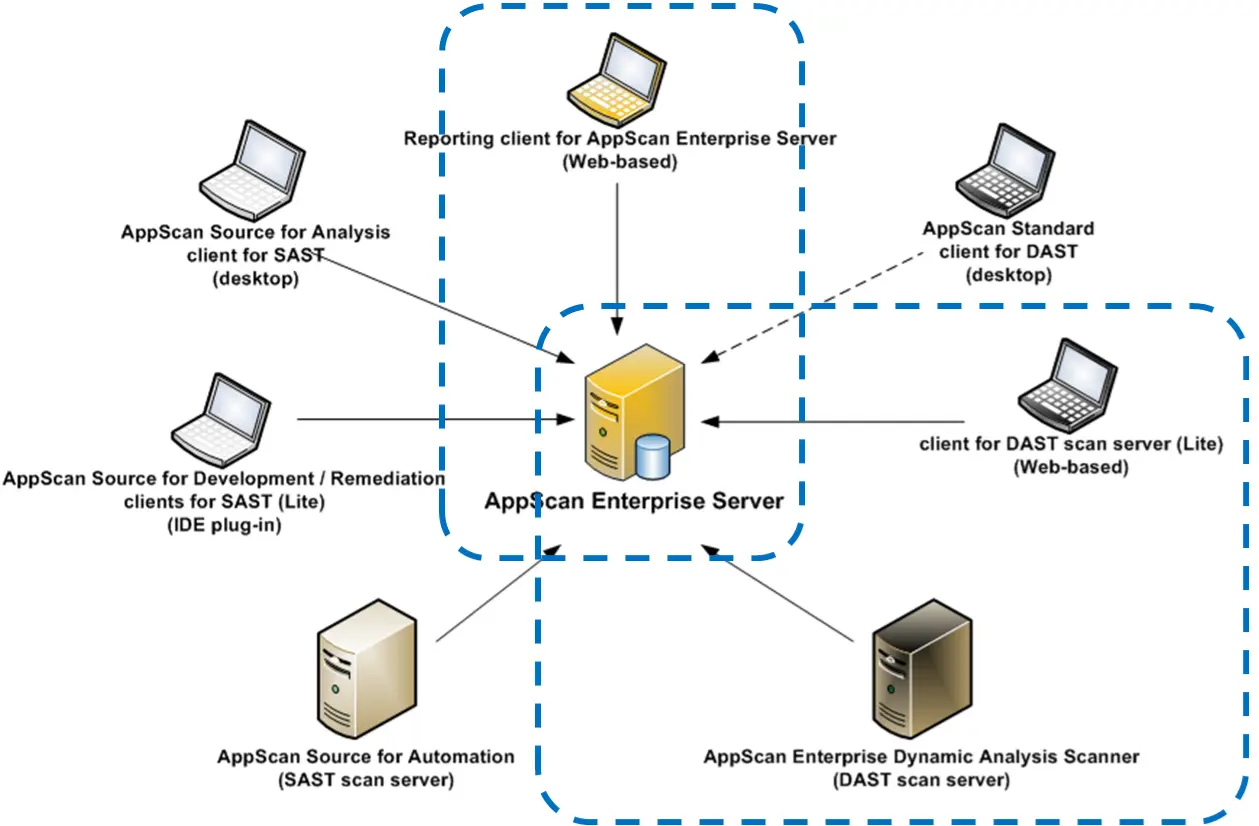
[ Product Diagram ]
User Management
The Enterprise Server's user management component is used for user authentication.
Enterprise Console
Provides user interface and reports through a web browser.
It is the primary user interface and supports management, scan configuration, and reporting.
Depending on requirements, one or more Enterprise Console instances can be installed on a single server.
Provides an overall view of the business portfolio through dashboard views.
Dynamic Analysis Scanner
The agent service monitors the SQL Server database for tasks to perform, and
the agent is a Windows process created by the agent service when there are tasks to perform. Local database files are created at the start of each scan.